What SaaS Companies Use Instead of Google Sheets to Track Customer Contracts and Renewals
CRM, CLM, billing tool or database? Why customer contracts and renewal terms belong in the billing tool once you leave Google Sheets.
5 mins
November 5, 2026
Key Takeaways
Search for a Google Sheets alternative for renewals and a lot of what comes back is about the wrong type of contracts. It describes tools for tracking the software your company buys: the design seats, the analytics tool, the annual security license. That's vendor SaaS renewal tracking, and it's a real job. It just isn't the job you have if you’re looking to manage your commercial agreements with your customers.
For customer renewals, the answer is your billing tool. It's the one system that has to know what each customer is paying today, because it issues the next invoice. Your CRM can still run the renewal forecast, and a contract lifecycle management (CLM) tool can still help legal negotiate and store the paper, especially the Master Services Agreement (MSA). But when a customer adds seats or moves to a higher plan mid-term, the billing tool is where that change has to land, and the renewal should be built from the billing tool.
This matters most when your packages change mid-term. A date in a spreadsheet tells you when a contract ends. It doesn’t tell you what the customer is paying today, whether the contract auto-renews, or what price increase applies at renewal.
Are you tracking customer contracts or vendor SaaS subscriptions?
Two very different spreadsheets go by the name "renewal tracker."
The first type tracks the software your company pays for. Procurement or IT owns it. The rows are vendors, the money flows out, and the goal is to cancel or renegotiate before an auto-renewal locks in another year of spend you don't need. Missing a date here costs you a year of a tool nobody uses.
The second type tracks the contracts your customers signed with you. Typically, RevOps, the account owner and Finance share it. The rows are customers, the money flows in, and the goal is to renew on the right terms, at the right price, before the customer's exit window closes. Missing a date here costs you revenue, and sometimes the customer.
The second spreadsheet is harder to keep accurate, for a plain reason: the terms came out of contract negotiation, so they're rarely standard. One customer has a 60-day non-renewal notice. Another has 90 days and a 5% cap on price increases. A third added a module halfway through the term and co-termed it to the original end date. Each of those terms lives in a PDF, and the spreadsheet typically holds only the terms from the original agreement.
A 2025 white paper from World Commerce & Contracting found that the average business loses almost 9% of value each year to poor contract management.
Customer contracts also run on two clocks, and spreadsheets usually track one.
The first clock is the customer's. If the contract auto-renews unless the customer gives notice, there is a date after which they can no longer walk away from the renewal. Before that date, the renewal is at risk. After it, the renewal is committed.
The second clock is yours. Contracts commonly let you raise the price at renewal only if you give written notice by a set date. Miss that date and the contract renews at the old price.
Here's how that plays out. A customer pays $240,000 a year on a term ending March 31, 2027. The contract auto-renews unless the customer gives 60 days' notice. It also allows a 5% increase with 90 days' written notice, so your notice has to go out by December 31, 2026. The spreadsheet has one date column, and it says March 31, 2027. If the account owner plans the renewal conversation for February, the uplift notice is already more than a month late. That's $12,000 of contracted increase, gone for a full year, on one account.
What to use instead of Sheets: CRM, CLM, SaaS management platform, or structured database
The first option is your CRM. HubSpot renewal tracking and Salesforce renewal tracking usually work the same way: a renewal deal or opportunity is created when the original deal is closed, with an owner, a stage, an amount and a close date. That puts renewals in the forecast next to new business, which is exactly where your CRO wants them. Where it breaks: the CRM holds what the rep entered when the deal closed. An upgrade signed in June or a seat reduction processed by Finance typically never makes it back to the renewal record. The fix isn't to make the CRM the record of terms. It's to let the billing tool set the renewal amount and terms, so the forecast reflects what the customer is actually paying.
The second option is a CLM. Legal or the deal desk usually owns it. A CLM is where contractual terms get negotiated and stored: the redlines, the signed version, every amendment. For a sales-led team, one of its most useful jobs is the clause library. Legal writes pre-approved terms once, and reps drop them into contracts without sending every deal through legal review. Where it breaks: a CLM knows what the contract says. It doesn't know what was invoiced last month or which plan the customer moved to in June.
The third option is the one that matters most, and it's easy to miss. Search for a SaaS management platform and you'll mostly find tools for the software your company buys. For the contracts you sell, the platform that manages your customers' subscriptions is your billing tool. It holds the products, quantities and prices each customer has, and it issues their invoices. That makes it the one system that can't be wrong about current terms: a wrong number lands on the invoice.
It's also why mid-term changes have to land there. When a customer adds 25 seats, upgrades from one plan to a higher one, or adds a product, the billing tool needs the change with its effective date. If the change only reaches the CRM, or sits in an amendment PDF, the next invoice is wrong and the renewal gets quoted from the old terms. The billing tool should be the system that knows exactly what will renew.
The fourth option is a structured database such as Airtable. You get typed fields, linked records, filtered views and basic automations, so a notice deadline can be a real date with a reminder attached instead of a cell somebody color-coded. It's fast to set up and costs little. Where it breaks: it's still a copy. Every term in it was typed from a contract by a person, and nothing updates it when the customer's billing changes.
| Option | Built for | Typically owned by | Holds | Role in renewals |
|---|---|---|---|---|
| CRM | Pipeline and renewal forecast | RevOps, sales leadership | Renewal deal, owner, stage, amount | Forecast, with the amount taken from billing |
| CLM | Negotiating and storing contract terms | Legal, deal desk | Signed contract, amendments, pre-approved clauses | The legal language and the negotiation history |
| Billing tool | Invoicing what each customer bought | Finance, RevOps | Current products, quantities, prices, renewal terms, invoices | The record every renewal is built from |
| Structured database | A cleaner register than Sheets | Whoever builds it | Typed fields, linked records, reminders | A bridge; a manual copy with no link to billing |
Only one tool holds the price the customer is paying right now. Every other tool either copies that number or doesn't store it, and every copy is one more place a renewal price can be wrong.
Which approach fits your team size and contract owner?
The right setup for SaaS contract renewal tracking depends less on company size than on two questions: how often your contracts change after signature, and who owns each part of the renewal.
Start with the money at stake. SaaS Capital's 2025 retention benchmarks found a median gross revenue retention of 91% across private B2B SaaS companies. At $16.5M in ARR, a 91% gross retention rate means roughly $1.5M walks out each year before expansion. Some of that is churn no tracker would have saved. Some of it is a notice window nobody watched.
Then look at who actually owns what. By this stage, a renewal typically has at least three owners:
- The account owner (an account manager or customer success lead) owns the relationship and the renewal conversation.
- Legal or the deal desk owns the paper: the clauses, the redlines, the signed version.
- Finance owns the price that is actually billing and the sent invoices.
RevOps usually owns how those three fit together. When the glue is a spreadsheet, RevOps reconciles them by hand every quarter. When the billing tool holds the current terms, the account owner and the forecast read from it, and the reconciliation is typically just about handling a few exceptions.
Here’s how the setup usually changes as your contract book gets more complex:
Standard order form, few amendments
If most customers sign your standard order form and only a handful amend, the complexity is low. A useful test: one person in RevOps can name every non-standard contract from memory. Store the renewal terms in the billing tool, let the renewal amount flow to the CRM for the forecast, and build one report sorted by the earliest notice deadline. The work is discipline, not software.
Legal negotiates most deals
If customers request redlines for many deals, add a CLM for the negotiation and the clause library. Once a contract is signed, its commercial terms (price, renewal term, notice period, price increase) still have to land in the billing tool. The signed contract is the authoritative truth, the billing tool keeps its commercial terms current, and the CRM reads from billing. Without clarity on which is the source of truth, you can end up with conflicting notice dates for the same customer and no way to tell which is right.
Upgrades, ramps or usage every quarter
If customers regularly add seats mid-term, move to higher plans, sign deals with ramped pricing, or pay for committed usage with additional charges billed in arrears, most renewals depend on billing data. The CRM and the CLM describe the deal as it was signed. Only the billing tool knows what the customer has at the end of the contract, which is the starting point to build each renewal quote from.
Still deciding: a database as a bridge
A structured database such as Airtable is a reasonable stopgap when you need something better than Sheets this quarter and your billing tool decision isn’t made yet. We suggest planning to sunset the database. A bridge solution that becomes permanent turns into a spreadsheet with better formatting.
Across all four, key details must be kept up to date or your renewal quotes will be based on stale data no matter what.
What fields must your billing tool capture for each renewal?
Dates
- Contract start date and end date.
- The auto-renewal date: the day the next term starts if nobody acts.
- The renewal term: how long the next term runs (12 months is common; some contracts renew for the original multi-year term).
- The renewal notice deadline: the last day the customer can give non-renewal notice. Store it as a date, calculated from the end date and the notice period.
- The price-increase notice deadline, if your contract requires one.
Renewal terms
- Whether the contract auto-renews at all.
- The notice period: how many days before the auto-renewal date the customer has to give notice, and the form that notice has to take (written notice, email to a named address).
- Whether a price increase applies at renewal, how it's set (a fixed percentage, a cap, or an index), and how many days' notice you have to give before it takes effect.
- Termination rights, including termination for convenience.
Commercial state
- The plan, products, quantities and prices active today, after every upgrade and seat change.
- Current ACV after every amendment, not the ACV at signature.
- For usage deals, the committed amount and the history of additional charges.
- Billing frequency and payment terms.
- The effective date of the most recent amendment.
- Open invoices and anything past due, because a customer with a 75-day-old invoice is having a different renewal conversation.
Ownership and decision
- Renewal owner: one name, not a team.
- Renewal status: planned, at risk, notice received, renewed, or churned.
- Date the renewal quote was sent and the date it was signed.
For example, a customer signed at $185,000 a year, renewing September 30, 2027. On February 1, 2027, they added 40 seats at $900 a seat per year, co-termed to the same end date. Their annual run rate is now $221,000. If that amendment reached the billing tool, the next invoice and the renewal both start from $221,000. If it only reached a CRM field or a spreadsheet, the renewal would list $185,000.
The contract allows a 4% increase at renewal. Built from the old number, the renewal quote comes out at $192,400. Built from what the customer actually pays, it should be $229,840. If nobody catches it, that's $37,440 a year in contracted revenue that the renewal quote leaves out, and the customer signs the lower number happily.
How to move customer contracts out of Sheets without losing notice dates
The risk in a migration isn't the new tool. It's the handful of contracts whose notice deadlines fall during the cutover. Here are six steps to mitigate risk:
- Freeze the spreadsheet and pull every signed document. Make the sheet read-only for everyone but the person running the migration. For each row, find the signed contract and every amendment. Flag any row that has no source document: those are the rows most likely to be wrong.
- Rebuild each notice deadline. Don't copy the spreadsheet's date column. Take the current term end and the notice period from the signed contract (and the latest amendment, if it changed the term), calculate the deadline, and compare it with what the sheet says. Every mismatch is a finding. Expect some exceptions - an amendment that extended the term is the usual culprit.
- Sort by the earliest deadline and prioritize the next 120 days. Any contract with a customer notice deadline or a price-increase notice deadline in the next four months gets verified first and stays tracked in both the old sheet and the billing tool until the cutover is done.
- Assign one owner to every record before it moves. If a renewal has no named owner, it will have no owner when its notice window opens, which typically means a missed notice deadline.
- Load each contract into the billing tool with its amendments as separate, dated events, and its renewal terms alongside. The record should show the original terms and each change with its effective date, not a single overwritten price. In Turnstile, a subscription can be added directly for an agreement signed outside the platform, so contracts already signed don't need to be re-signed.
- Reconcile, then point the CRM at billing. For each customer, compare the current price in the billing tool with the most recent invoice actually issued. Where they differ, one of them is likely wrong, and you want to know which before the renewal quote goes out. Then set the CRM's renewal amounts from the billing record and archive the spreadsheet.
Budget about 30 minutes a contract for steps 1 and 2, more for heavily negotiated paper. A 100-contract book at 30 minutes each is 50 hours: a little over a week of one person's time. Compare that against a single missed price-increase notice on a $240,000 account, which costs $12,000 for a year.
When renewals need to connect to quotes, amendments, and billing
At some point, keeping a separate tracker accurate becomes its own job. The same 2025 World Commerce & Contracting white paper found that contract-related data is spread across 24 different systems on average. Every handoff between those systems is a place where the renewal price, the notice date or the active products can drift.
That drift usually occurs when two or more of these are true:
- More than a few customers amend mid-term each quarter.
- You sell deals with ramped pricing, where each year has its own price.
- Customers pay a committed usage amount with additional charges on top, billed in arrears.
- Finance regularly corrects renewal quotes before they go to the customer.
- Your CRM's renewal amount and your billing system's run rate disagree on more than a few accounts.
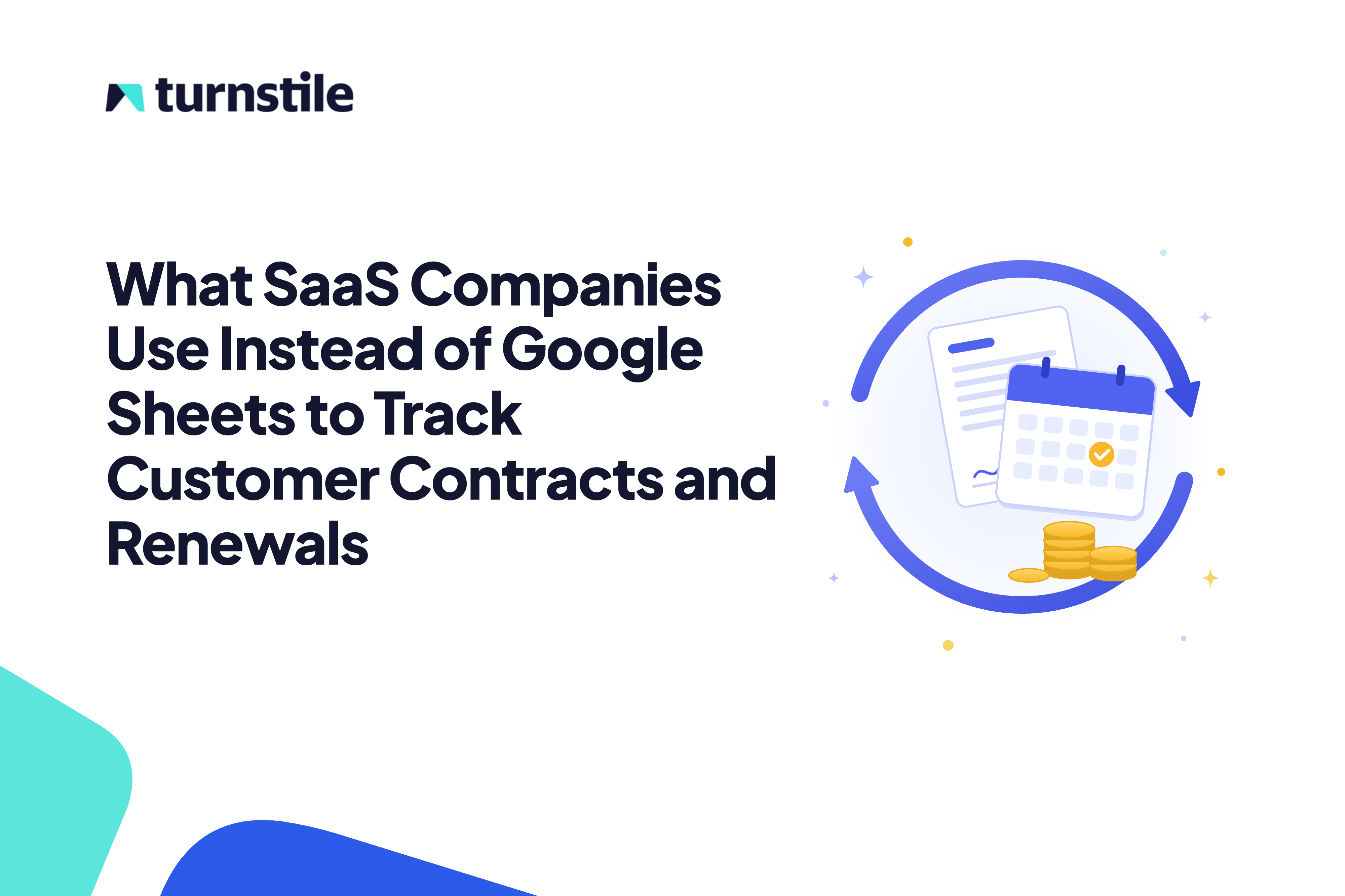
When that's your situation, the fix isn't a better tracker. It's building the renewal from the record that already bills the customer. That record sits at the end of your quote-to-cash process (the process from creating a quote through collecting payment and recognizing revenue). When those steps all occur in one system, the signed quote becomes the subscription, the subscription produces the invoices, and each amendment changes the subscription. If the renewal quote starts there, it’s guaranteed to be accurate.
When you renew a subscription in Turnstile, it creates a quote prefilled from the existing subscription, starting after the current term ends. The account owner starts the quote from the products, quantities and prices the customer is on today, including the seats they added mid-term, rather than from the original quote.
Mid-term changes stay visible the same way. When an account amends, the amendment shows the original and the amended subscription side by side with the changes highlighted, and the adjustment is billed as a separate line dated to the amendment's effective date. The original charge stays as it was invoiced, so Finance can trace exactly what changed and when, and the next renewal inherits the amended terms.
This doesn't replace every legal or procurement tool. The CLM remains the place legal negotiates terms and keeps the pre-approved clauses reps reuse. Your company's own software subscriptions still belong in whatever tool procurement uses for vendor spend. What moves into the billing tool is the commercial side: the terms that bill, the amendments that changed them, and the renewal that continues them.
One question tells you where you stand: how many systems does someone have to open to answer "what will this customer's renewal quote say?" If the answer is three, the renewal price is a reconciliation, not a lookup.
Build every renewal from the terms that bill
Make the billing tool the record every renewal is built from. Update it for every mid-term change, store the renewal terms in it next to the products and prices, and let the CRM take its renewal amounts from it rather than keep its own copy.
See how Turnstile builds renewals from the live subscription: book a demo.
FAQ
What's the difference between tracking customer contracts and tracking the software you buy?
Customer contracts are the agreements your customers signed with you, and tracking them protects revenue. Vendor subscriptions are the software your company pays for, and tracking them controls spend. Customer contract management involves negotiated terms, amendments and billing data that change after signature. Vendor tracking mostly needs spend visibility and a reminder before your own auto-renewals.
Can HubSpot or Salesforce replace a renewal spreadsheet?
A CRM can replace the forecasting part of a renewal spreadsheet. A renewal deal or opportunity gives each renewal an owner, a stage and an amount in the pipeline. The amount and the renewal terms should come from the billing tool, which knows what the customer is paying after every upgrade and seat change. If those are typed into the CRM by hand, the CRM drifts from the truth.
How early should a renewal conversation start?
Start the conversation before the earlier of the two notice deadlines (price increase notice, non-renewal notice), not immediately before the contract end date. On accounts above $150,000, starting 90 to 120 days ahead of the customer's notice deadline leaves room for a pricing conversation and a procurement review.
Do you need a CLM to track customer renewals?
A CLM is worth it when customers negotiate a lot of terms in your contracts. It stores the signed document and amendments, and its clause library lets legal pre-approve terms that reps reuse without a legal review on every deal. It doesn't know what was invoiced or which plan the customer is on today, so the commercial terms still need to live in the billing tool.
What happens to a renewal when the customer contract is amended mid-term?
The renewal should start from the amended terms, not the original contract. If a customer added seats or products partway through the term, those are part of their current run rate and part of the base any price increase applies to. Building the renewal from the original quote is a common way contracted revenue goes unquoted.